WeTransfer Alternatives: How to Send Large Files Securely

The best WeTransfer alternative depends on what you're sending. For files that don't matter much, a free European service like SwissTransfer is enough. For client documents, personal data or regular transfers, you're better off with a tool you control. That means an open source app on your own server, with a password, access only for the intended recipients and automatic deletion of files, as the CNIL (France's data protection authority) recommends.
Key takeaways:
- In July 2025, WeTransfer had to rewrite clause 6.3 of its terms of service in under 48 hours. The clause had given it a perpetual, worldwide license to transferred files.
- According to a comparison published by its competitor TransferNow, WeTransfer's free plan is capped at 3 GB per transfer, 10 transfers per month and 3 days of availability.
- The CNIL considers consumer file-sharing platforms rarely a safe way to send personal data.
- To send a sensitive file, protect it with a password shared through a separate channel (text message or phone call), limit access to the recipients and set it to delete automatically.
- Self-hosted open source tools like PsiTransfer keep files on your own server, but they don't always offer end-to-end encryption. Check this before you use them for sensitive data.
Table of Contents
- Why look for a WeTransfer alternative?
- What are the limits of WeTransfer's free plan today?
- Is WeTransfer suitable for personal and business data?
- How do you send a large file securely?
- What are the free European alternatives to WeTransfer?
- Which self-hosted open source alternatives should you choose?
- Do your transfers need end-to-end encryption?
- Which solution fits your needs?
- Yundera: file transfers from your own server
- The most common mistakes when sending large files
- Sources
- Frequently Asked Questions
Why look for a WeTransfer alternative?
You have no say in how WeTransfer handles your files. The company can change its terms of service at any time, as the controversy in summer 2025 showed. For business or personal documents, that alone is a good reason to look for a tool you control.
- Clause 6.3: the new version of the terms granted WeTransfer a “perpetual, worldwide, non-exclusive, royalty-free, transferable, sub-licensable” license to hosted files. It was due to take effect on August 8, 2025, according to Journal du Geek.
- The U-turn: after the backlash, the clause was “completely rewritten in under 48 hours.” It no longer mentions AI or machine learning. It now grants only a “royalty-free license to operate, develop and improve the service.”
- The official position: WeTransfer stated: “We don't use machine learning or any form of AI to process content shared via WeTransfer, nor do we sell content or data to any third parties.”
- The context: the controversy broke out a few months after WeTransfer was acquired by Bending Spoons, the Italian company that also owns Evernote, Filmic Pro and Meetup.
The lesson isn't about what actually happens to your files. Nobody has shown that they were misused. The lesson is about dependency: a free service can rewrite its rules, and you only find out afterwards, often from the press.
Pro tip: reread the terms of your file transfer tools whenever they change owners. That is often when the terms change.
What are the limits of WeTransfer's free plan today?
WeTransfer's free plan now has three caps: 3 GB per transfer, 10 transfers per month and 3 days of availability. These figures come from a comparison published by TransferNow, updated on July 30, 2026. TransferNow is a direct competitor, so check the current terms on wetransfer.com before you decide.
- Size per transfer: 3 GB today, up from 2 GB before 2024.
- Number of transfers: 10 per month, where they used to be unlimited.
- Availability: 3 days, down from 7.
If you only send files now and then, you'll barely notice these limits. For professionals who regularly send large files, they quickly get in the way:
- Freelance video editor: a single 4K rush can go over 3 GB. You then have to compress or split the transfer, which costs you time and quality.
- Agency or designer: with two or three mockup deliveries a week, you hit the 10-transfer cap before the end of the month.
- Hard-to-reach client: a link sent on Friday may have expired by the time it's opened the following Monday. You have to send it again, and that eats into your quota too.
Pro tip: count your transfers over a typical month, listing files over 3 GB separately. If you regularly go over the limits, you need a tool with no monthly quota, not a stopgap subscription.
Is WeTransfer suitable for personal and business data?
For files that don't matter much, WeTransfer is fine. For personal data or sensitive documents, the service isn't banned as such, but it becomes hard to prove you're in control of the transfer. In its guidance sheet updated on March 14, 2024, the CNIL states that consumer channels, including “file-sharing platforms,” “are rarely a secure means of communication” for personal data.
When a company sends a customer file, an HR folder or health data, the company remains the data controller, not the tool. In practice, it must be able to justify three things:
- The choice of tool: knowing where the files are stored and under what terms, and why this service suits how sensitive the data is.
- Oversight of the provider: a service that stores your files on your behalf is a processor under Article 28 of the GDPR. Its commitments must be formalized and verifiable, which is hard with consumer terms that can change at any time.
- The retention period: the CNIL asks you to “set a limited period during which files are available” and to “restrict access to the files to duly authorized recipients only.”
So the question isn't whether WeTransfer is “legal.” It's whether, in the event of an audit or a leak, you can show who accessed the file, for how long and under what rules.
Pro tip: sort your transfers into two categories: routine and sensitive. Keep consumer services for the first, and use a tool whose rules you set yourself for the second.
How do you send a large file securely?
Sending a large file securely comes down to four habits, all drawn from the CNIL's recommendations on exchanges with outside parties: a tool you control, restricted access, a secret shared separately and scheduled deletion.
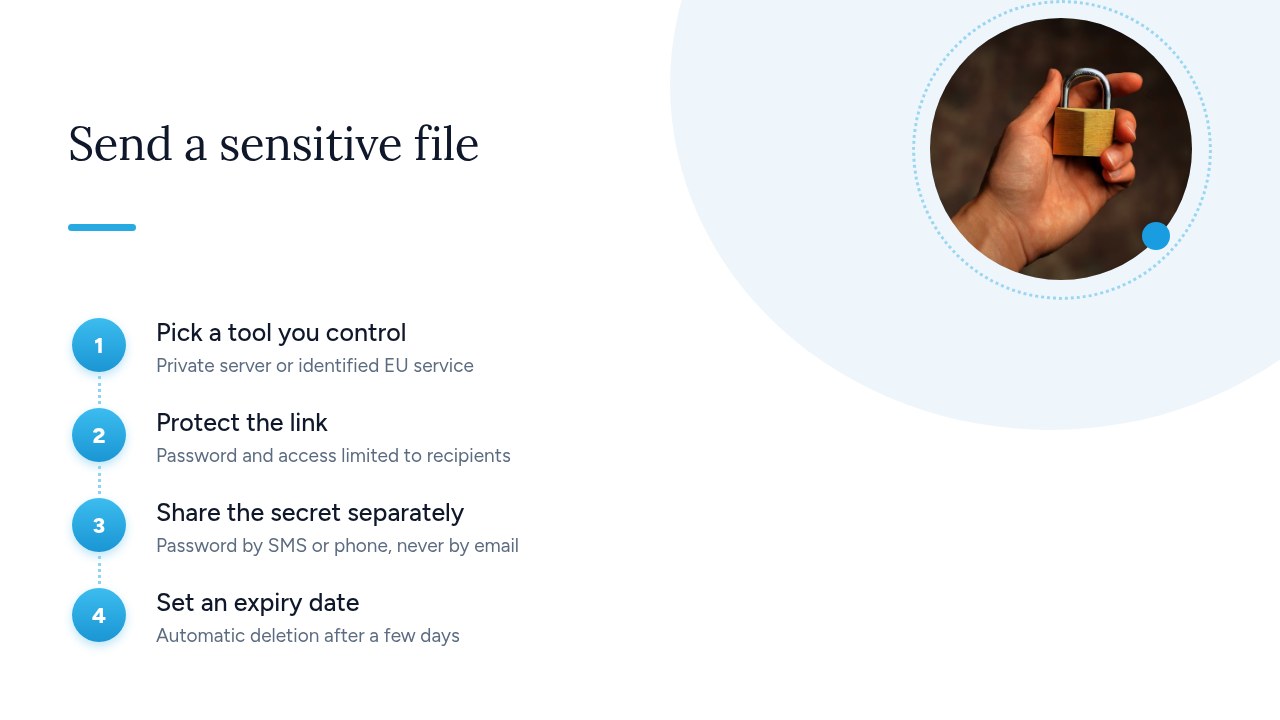
- Choose a tool you control: pick a service whose host and terms you know, and that transfers files over “SFTP or HTTPS,” “using the most recent versions of the protocols.”
- Protect the link: password-protect the download and limit access to authorized recipients only. A public link forwarded by mistake shouldn't be enough to open the files.
- Share the secret separately: the CNIL recommends sending secrets “through a separate channel.” Its example is an encrypted file sent by email with the password shared “by phone or text message.” If the link and the password go out in the same email, a single intercepted message gives away everything.
- Schedule expiry: keep files available only as long as the recipient needs them. The CNIL explicitly lists as a mistake “failing to provide for the deletion (preferably automatic) of files sent via a file transfer platform.”
These four steps apply whatever the tool. A free service with no password and no adjustable expiry won't let you follow this method.
Pro tip: agree on a password with your regular clients over the phone once, then change it for each project. You won't be tempted to write it in the email.
What are the free European alternatives to WeTransfer?
The most generous free European alternative is SwissTransfer, the Swiss service from Infomaniak. TransferNow is a second option for smaller transfers. Both fix the quota problem, but not the control problem.
- Size: according to SwissTransfer, you can send “up to 50 GB per transfer, for free, without creating an account.”
- Retention: up to 30 days on the free plan, with an email reminder on day 12. The 60-day option is only available on SwissTransfer Enterprise. Once they expire, files are deleted automatically, which matches the CNIL's recommendation.
- Access control: a password and a download limit are available, but they're optional. It's up to you to remember to turn them on.
- Encryption: files are “encrypted in transit and at rest,” but the FAQ notes: “This is not end-to-end encryption.”
For its part, TransferNow advertises 5 GB per transfer for free, with no monthly transfer limit. That's its own claim, published in a comparison against WeTransfer, so check the terms before you adopt it.
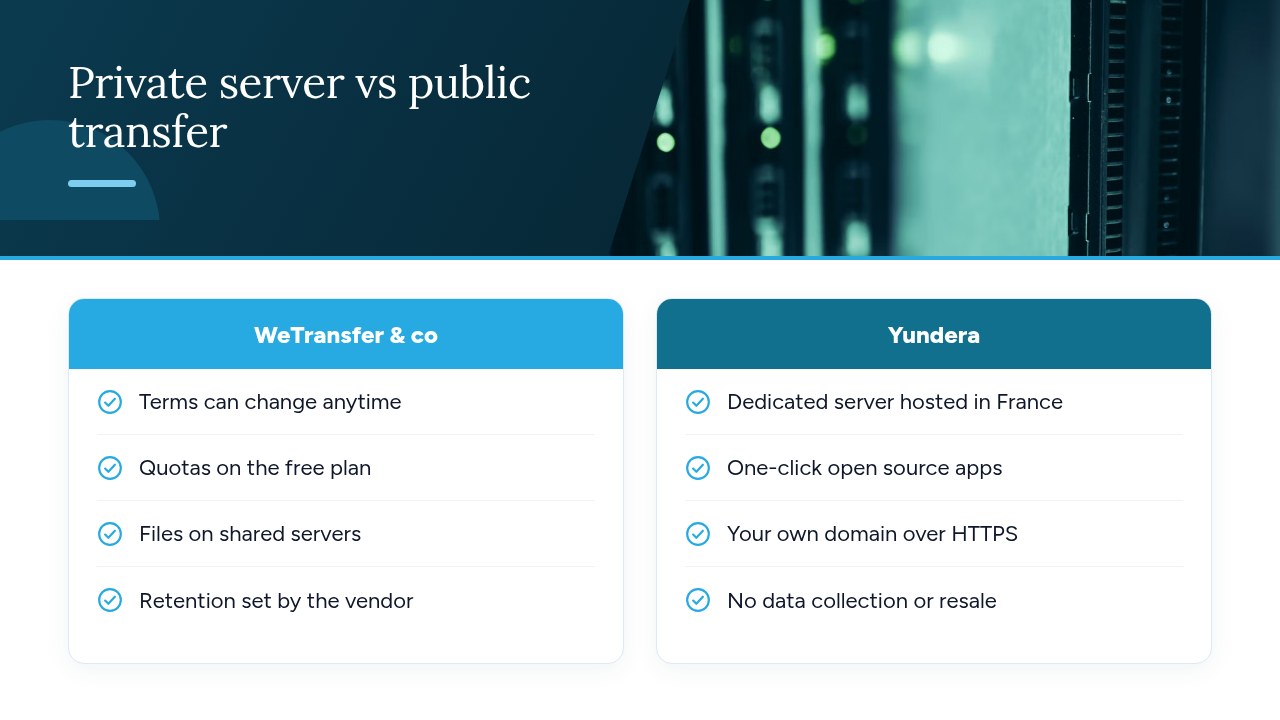
These services work well for non-sensitive files: family photos, mockups that are already public, slide decks. But your files are still stored by a third party, under its terms, which it can change. For customer or HR data, the underlying problem the CNIL raises remains.
Pro tip: on SwissTransfer, choose the shortest retention period and always turn on the password. Neither is enabled by default.
Which self-hosted open source alternatives should you choose?
The two simplest open source projects for replacing WeTransfer on your own server are PsiTransfer and Lufi. Their main advantage is the same: files never leave your server, and you set the retention and access rules.
- PsiTransfer: its GitHub repository describes it as a “simple open source self-hosted file sharing solution,” an alternative to paid services like Dropbox or WeTransfer. It's released under the BSD-2-Clause license and ticks several boxes of the CNIL method:
- Resumable transfers: based on the tus.io protocol, they let you resume an interrupted large upload without starting over.
- Expiry: you set a lifetime for each batch of files.
- One-time download: the link only works once.
- Password: the download list can be password-protected (AES).
- Lufi: the name stands for “Let's Upload that FIle.” It's file-sharing software licensed under the GNU AGPLv3, in development since September 2015 and hosted on Framagit. Check its documentation for the security features you need before you deploy it.
One limitation to be aware of: the PsiTransfer README states that there is no end-to-end encryption of content (yet). Files are protected by your server, not encrypted for the recipient alone.
Pro tip: self-hosting also means handling updates and the HTTPS certificate yourself. If nobody in your organization is responsible for that, the tool itself could become a security hole.
Do your transfers need end-to-end encryption?
For routine files, encryption in transit and at rest is enough. For health data, legal documents or HR files, end-to-end encryption is the real guarantee of confidentiality: it's the only kind that stops the host itself from reading your files.
- Encryption in transit: HTTPS protects the file on its way between your computer and the server. Nobody can read it on the network, but it arrives on the server unencrypted.
- Encryption at rest: the file is encrypted on the service's disks. The service holds the keys, so it can technically access it. That's the case with SwissTransfer, “encrypted in transit and at rest,” whose FAQ notes: “This is not end-to-end encryption.”
- End-to-end encryption: the file is encrypted before it leaves your computer and only decrypted on the recipient's side. The host only sees an unreadable blob.
On the self-hosted side, PsiTransfer doesn't offer it yet either. Its password protects access to the download list, not the content itself.
For highly sensitive data, the practical solution is to encrypt the files yourself before sending them. Create an encrypted archive (for example with 7-Zip using AES-256), upload it to the transfer tool of your choice, then share the password through a separate channel, by phone or text message, as the CNIL recommends. To learn more, read our complete guide to end-to-end encryption.
Pro tip: in 7-Zip, also tick the option to encrypt file names. Otherwise, a name like “payslips_2026” can be read without the password.
Which solution fits your needs?
The right tool depends on two things: how sensitive your files are and how often you send them. The higher either one gets, the more it pays to keep your files on a server you control.
- Individual, occasional non-sensitive transfers: a free European service like SwissTransfer is enough for holiday photos or a family video. Turn on the password and choose the shortest retention period.
- Freelancer or agency, frequent large transfers: pick a tool with no monthly quota so you no longer have to split your rushes or ration your deliveries. If you can, use your own domain: a link with your name on it inspires more trust in clients than a generic address.
- Small business handling customer data: move to a private server with rules you set yourself: automatic expiry, mandatory passwords and, if the tool supports it, a download log. Check that last point before choosing.
- IT manager: build the self-hosted tool into your retention policy and document its settings. For recurring exchanges between organizations, keep SFTP, which the CNIL lists alongside HTTPS as a preferred protocol.
Whatever your situation, the CNIL's two requirements stay the same: a limited availability period and access restricted to authorized recipients only. If your current tool doesn't let you set these, it's a sign you should switch.
Pro tip: don't multiply tools. A free service for occasional use and a tool you control for everything else is enough. Beyond that, your teams won't know which one to use.
Yundera: file transfers from your own server
Yundera lets you send files from a server you control, without having to manage it yourself. The service provides a managed private server, the Personal Cloud Server, hosted in France and dedicated to a single customer. This solves the problem raised throughout this article: your files no longer depend on the terms of a consumer service that a company can rewrite overnight. Your data stays on your own server, and Yundera neither collects nor sells it.
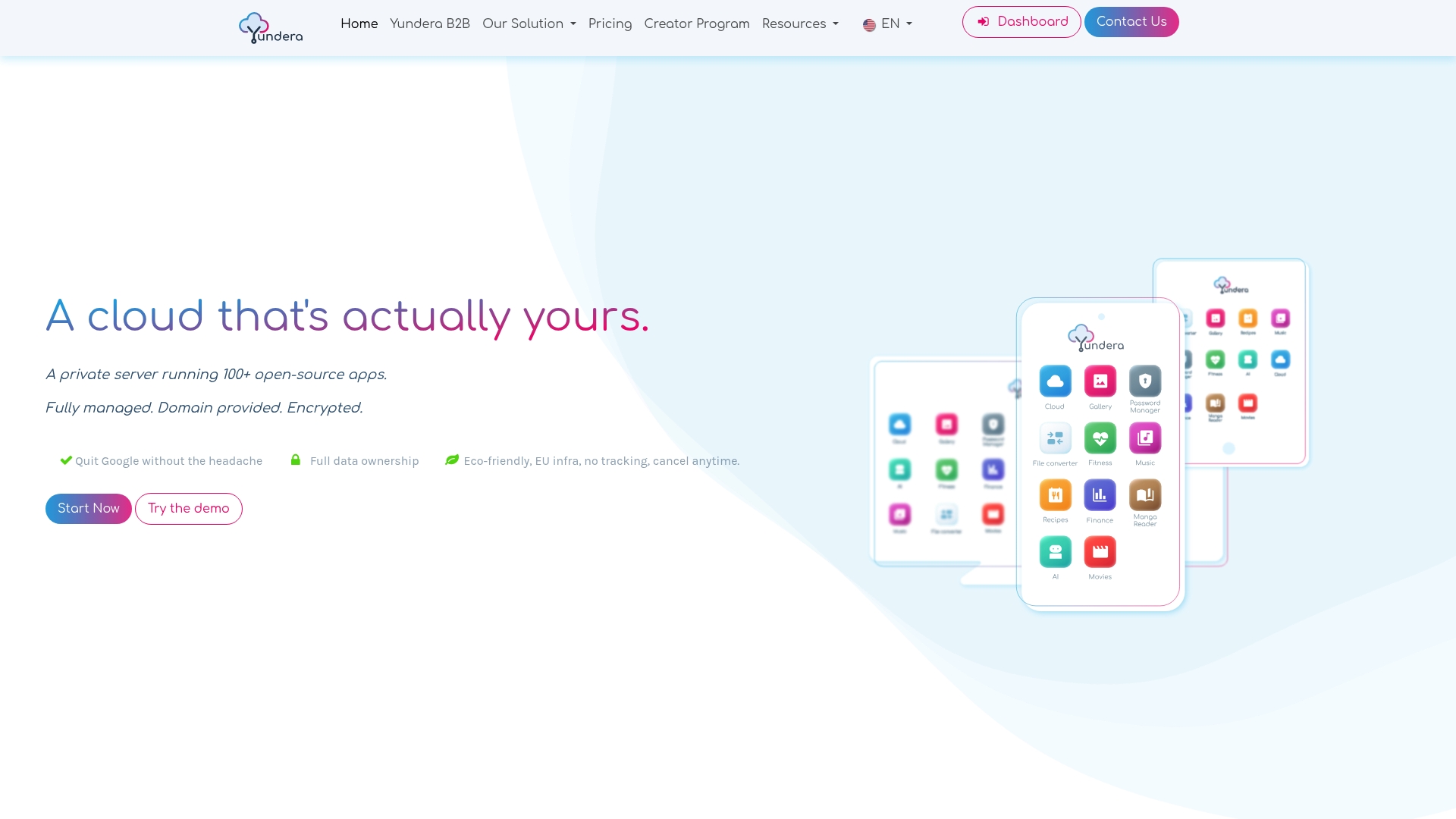
The server comes with ready-to-use open source apps, including for file storage, photos, website hosting and office work. You install them in one click from an app store. Each app is available on your own domain over HTTPS, with no static IP, no port forwarding and no manual certificate setup. Your clients get a link with your name on it, which matters for a freelancer or an agency. No technical skills are needed, because Yundera manages the server. Sharing settings are still up to you: apply the method described above and our practical guide to secure file sharing.
To compare plans and pricing, visit the Yundera private servers page.
The most common mistakes when sending large files
The most common mistakes come from how the tool is used, not from the tool itself:
- Password in the same email: a single intercepted message gives access to everything. The CNIL recommends a separate channel.
- Files available indefinitely: the CNIL lists failing to delete files among the things not to do.
- A consumer service for HR or health data: you won't be able to prove who accessed what.
- Confusing “encrypted” with “end-to-end”: a file encrypted at rest can still be read by the host.
- Never rereading the terms: the WeTransfer case in 2025 shows they can change after an acquisition.
- Running a business on a free quota: the day the limits shrink, your deliveries grind to a halt.
The rule to remember: first decide how sensitive your files are, then choose the tool. Not the other way around.
— Yundera
Sources
- WeTransfer backtracks on the use of your data - Journal du Geek
- Security: Securing exchanges with outside parties - CNIL
- SwissTransfer - Send large files securely and for free
- WeTransfer Limits vs TransferNow in 2026
- psi-4ward/psitransfer: Simple open source self-hosted file sharing solution - GitHub
- Fiat Tux / Hat softwares / Lufi - GitLab
Frequently Asked Questions
What is the best free alternative to WeTransfer?
For non-sensitive files, SwissTransfer is the most generous free option: up to 50 GB per transfer with no account, and storage for up to 30 days. Files are encrypted in transit and at rest, but not end-to-end. For customer data or regular business transfers, a tool hosted on a server you control is a better choice.
Does WeTransfer use my files to train AI?
WeTransfer says it doesn't. In July 2025, a new clause 6.3 in its terms of service sparked a controversy, and the company rewrote it in under 48 hours to remove any mention of machine learning. It stated that it uses “neither machine learning nor any form of AI” on shared content and doesn't sell any files or data to third parties, according to Journal du Geek.
How many GB can you send for free with WeTransfer?
According to a comparison published by TransferNow, the free plan is limited to 3 GB per transfer, 10 transfers per month and 3 days of availability. Before 2024, it allowed 2 GB per transfer, unlimited transfers and 7 days of availability. Since TransferNow is a competitor, check these figures on wetransfer.com.
Is sending customer data via WeTransfer GDPR-compliant?
It isn't banned as such, but your company remains the data controller. It must be able to justify its choice of tool, oversee the provider and control how long files are kept. The CNIL considers consumer file-sharing platforms rarely a secure means of communication for personal data. For HR or health data, use a tool you control and encrypt files before sending them.
Can you host your own file transfer service?
Yes, with open source software like PsiTransfer (BSD-2-Clause license) or Lufi (GNU AGPLv3 license). PsiTransfer offers resumable transfers, an expiry date, one-time downloads and password protection, but no end-to-end encryption yet. You'll need to handle updates and the HTTPS certificate yourself, though, or use a managed private server.
WeTransfer Alternatives: How to Send Large Files Securely